

In one of my recent projects I had to create a Wicket pagination component with one additional functionality allowing the user to dynamically change the maximum number of items presented on each page.
The finished component will look like below:
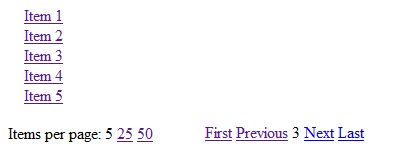
Of course I was not going to implement this from scratch, because most of the work had already been done by Wicket authors and committers in the component PagingNavigator. The source of this component as a reference to changes I made can be found here.
The first steps in creating our component
- add List itemsPerPageValues holding numbers for ‘items per page’ which will be shown to the user allowing him to click and change this value.
- provide default List DEFAULT_ITEMS_PER_PAGE_VALUES, which will be used (what a surprise!) as a default 🙂
- give our component a reference to the DataView object on which we will execute change items per page method.
Below we can see changes in class fields and constructors:
public class CustomPagingNavigator extends Panel {

  public static final String NAVIGATION_ID = "navigation";
  public static final List<Integer> DEFAULT_ITEMS_PER_PAGE_VALUES = Arrays.asList(5, 10, 50);

  private PagingNavigation pagingNavigation;
  private final DataView<?> dataView;
  private final IPagingLabelProvider labelProvider;
  private final List<Integer> itemsPerPageValues;
  private WebMarkupContainer pagingLinksContainer;

  public CustomPagingNavigator(final String id, final DataView<?> dataView) {
      this(id, dataView, null, DEFAULT_ITEMS_PER_PAGE_VALUES);
  }

  public CustomPagingNavigator(final String id, final DataView<?> dataView, List<Integer> itemsPerPageValues) {
      this(id, dataView, null, itemsPerPageValues);
  }

  public CustomPagingNavigator(final String id, final DataView<?> dataView, final IPagingLabelProvider labelProvider) {
      this(id, dataView, labelProvider, DEFAULT_ITEMS_PER_PAGE_VALUES);
  }

  public CustomPagingNavigator(final String id, final DataView<?> dataView, final IPagingLabelProvider labelProvider,
          List<Integer> itemsPerPageValues) {
      super(id);
      this.dataView = dataView;
      this.labelProvider = labelProvider;
      this.itemsPerPageValues = itemsPerPageValues;

        // these methods will be described later in this post
      addContainerWithPagingLinks();
      addLinksChangingItemsPerPageNumber();
  }
    (...)
}
The first new method is addContainerWithPagingLinks based mainly on onBeforeRender from PagingNavigator. This method adds paging links to the component to allow the user to change the number of the viewed page. One small addition is an overridden isVisible which will hide paging fragment when there is only one page to show.
private void addContainerWithPagingLinks() {

      pagingLinksContainer = new WebMarkupContainer("pagingLinksContainer") {
          @Override
          public boolean isVisible() {
              return dataView.getPageCount() > 1;
          }
      }

      pagingNavigation = newNavigation(dataView, labelProvider);
      pagingLinksContainer.add(pagingNavigation);

      // Add additional page links
      pagingLinksContainer.add(newPagingNavigationLink("first", dataView, 0).add(
              new TitleAppender("PagingNavigator.first")));
      pagingLinksContainer.add(newPagingNavigationIncrementLink("prev", dataView, -1).add(
              new TitleAppender("PagingNavigator.previous")));
      pagingLinksContainer.add(newPagingNavigationIncrementLink("next", dataView, 1).add(
              new TitleAppender("PagingNavigator.next")));
      pagingLinksContainer.add(newPagingNavigationLink("last", dataView, -1).add(
              new TitleAppender("PagingNavigator.last")));

      add(pagingLinksContainer);
  }
The next step is to override isVisible method in our component which will hide it completely when DataView has no items to render:
@Override
public boolean isVisible() {
  return dataView.getItemCount() > 0;
}
And now it’s time to create the core of our component: a place where items per page can be changed. This is done in method:
private void addLinksChangingItemsPerPageNumber() {
  ListView<Integer> itemsPerPageList = new ListView<Integer>("itemsPerPage", itemsPerPageValues) {
      @Override
      protected void populateItem(ListItem<Integer> item) {
          Link<Void> itemPerPageLink = new ItemPerPageLink<Void>("itemPerPageLink", dataView,
                  pagingLinksContainer, item.getModelObject());
          itemPerPageLink.add(new Label("itemsValue", item.getModel()));
          item.add(itemPerPageLink);
      }
  };

  add(itemsPerPageList);
}
In the above method we create a ListView for Integers from itemsPerPageValues and for each number we add a link (new class ItemPerPageLink explained below) which will change DataView itemsPerPage property. Apart from a reference to DataView we also give our link a reference to pagingLinksContainer to hide it after the user changes itemsPerPage and there will be only one page to show.
Complete class ItemPerPageLink source code:
public class ItemPerPageLink<T> extends Link<T> {

  private final int itemsPerPage;
  private final DataView<?> dataView;
  private final WebMarkupContainer pagingLinksContainer;

  public ItemPerPageLink(final String id, final DataView<?> dataView, WebMarkupContainer pagingLinksContainer, int itemsPerPageValue) {
      super(id);
      this.dataView = dataView;
      this.pagingLinksContainer = pagingLinksContainer;
      this.itemsPerPage = itemsPerPageValue;
      setEnabled(itemsPerPageValue != dataView.getItemsPerPage());

  }

  @Override
  public void onClick() {
      dataView.setItemsPerPage(itemsPerPage);
      pagingLinksContainer.setVisible(dataView.getPageCount() > 1);
  }

  @Override
  protected void onComponentTag(ComponentTag tag) {
      super.onComponentTag(tag);
      tag.put("title", itemsPerPage);
  }

}
In this class we:
- Disable the link for the number which is current dataView.itemsPerPage value.
- Hide pagingLinksContainer when there is only one page.
- Change itemsPerPage property in onClick method.
- Set the link title to the value of items per page.
And that’s all. For those who want a complete solution in one place there is the complete source of the class CustomPagingNavigator with its markup:
import java.util.Arrays;
import java.util.List;

import org.apache.wicket.Component;
import org.apache.wicket.behavior.AbstractBehavior;
import org.apache.wicket.markup.ComponentTag;
import org.apache.wicket.markup.html.WebMarkupContainer;
import org.apache.wicket.markup.html.basic.Label;
import org.apache.wicket.markup.html.link.AbstractLink;
import org.apache.wicket.markup.html.link.Link;
import org.apache.wicket.markup.html.list.ListItem;
import org.apache.wicket.markup.html.list.ListView;
import org.apache.wicket.markup.html.navigation.paging.IPageable;
import org.apache.wicket.markup.html.navigation.paging.IPagingLabelProvider;
import org.apache.wicket.markup.html.navigation.paging.PagingNavigation;
import org.apache.wicket.markup.html.navigation.paging.PagingNavigationIncrementLink;
import org.apache.wicket.markup.html.navigation.paging.PagingNavigationLink;
import org.apache.wicket.markup.html.navigation.paging.PagingNavigator;
import org.apache.wicket.markup.html.panel.Panel;
import org.apache.wicket.markup.repeater.data.DataView;

public class CustomPagingNavigator extends Panel {

  public static final String NAVIGATION_ID = "navigation";
  public static final List<Integer> DEFAULT_ITEMS_PER_PAGE_VALUES = Arrays.asList(5, 25, 50);

  private PagingNavigation pagingNavigation;
  private final DataView<?> dataView;
  private final IPagingLabelProvider labelProvider;
  private final List<Integer> itemsPerPageValues;
  private WebMarkupContainer pagingLinksContainer;

  public CustomPagingNavigator(final String id, final DataView<?> dataView) {
      this(id, dataView, null, DEFAULT_ITEMS_PER_PAGE_VALUES);
  }

  public CustomPagingNavigator(final String id, final DataView<?> dataView, List<Integer> itemsPerPageValues) {
      this(id, dataView, null, itemsPerPageValues);
  }

  public CustomPagingNavigator(final String id, final DataView<?> dataView, final IPagingLabelProvider labelProvider) {
      this(id, dataView, labelProvider, DEFAULT_ITEMS_PER_PAGE_VALUES);
  }

  public CustomPagingNavigator(final String id, final DataView<?> dataView, final IPagingLabelProvider labelProvider,
          List<Integer> itemsPerPageValues) {
      super(id);
      this.dataView = dataView;
      this.labelProvider = labelProvider;
      this.itemsPerPageValues = itemsPerPageValues;

      addContainerWithPagingLinks();
      addLinksChangingItemsPerPageNumber();
  }

  @Override
  public boolean isVisible() {
      return dataView.getItemCount() > 0;
  }

  private void addContainerWithPagingLinks() {

      pagingLinksContainer = new WebMarkupContainer("pagingLinksContainer") {
          @Override
          public boolean isVisible() {
              return dataView.getPageCount() > 1;
          }
      };

      pagingNavigation = newNavigation(dataView, labelProvider);
      pagingLinksContainer.add(pagingNavigation);

      // Add additional page links
      pagingLinksContainer.add(newPagingNavigationLink("first", dataView, 0).add(
              new TitleAppender("PagingNavigator.first")));
      pagingLinksContainer.add(newPagingNavigationIncrementLink("prev", dataView, -1).add(
              new TitleAppender("PagingNavigator.previous")));
      pagingLinksContainer.add(newPagingNavigationIncrementLink("next", dataView, 1).add(
              new TitleAppender("PagingNavigator.next")));
      pagingLinksContainer.add(newPagingNavigationLink("last", dataView, -1).add(
              new TitleAppender("PagingNavigator.last")));

      add(pagingLinksContainer);
  }

  protected PagingNavigation newNavigation(final IPageable pageable, final IPagingLabelProvider labelProvider) {
      return new PagingNavigation(NAVIGATION_ID, pageable, labelProvider);
  }

  protected AbstractLink newPagingNavigationIncrementLink(String id, IPageable pageable, int increment) {
      return new PagingNavigationIncrementLink<Void>(id, pageable, increment);
  }

  protected AbstractLink newPagingNavigationLink(String id, IPageable pageable, int pageNumber) {
      return new PagingNavigationLink<Void>(id, pageable, pageNumber);
  }

  private void addLinksChangingItemsPerPageNumber() {
      ListView<Integer> itemsPerPageList = new ListView<Integer>("itemsPerPage", itemsPerPageValues) {
          @Override
          protected void populateItem(ListItem<Integer> item) {
              Link<Void> itemPerPageLink = new ItemPerPageLink<Void>("itemPerPageLink", dataView,
                      pagingLinksContainer, item.getModelObject());
              itemPerPageLink.add(new Label("itemsValue", item.getModel()));
              item.add(itemPerPageLink);
          }
      };

      add(itemsPerPageList);
  }

  public final PagingNavigation getPagingNavigation() {
      return pagingNavigation;
  }

  private final class TitleAppender extends AbstractBehavior {
      private static final long serialVersionUID = 1L;

      private final String resourceKey;

      public TitleAppender(String resourceKey) {
          this.resourceKey = resourceKey;
      }

      @Override
      public void onComponentTag(Component component, ComponentTag tag) {
          tag.put("title", CustomPagingNavigator.this.getString(resourceKey));
      }
  }
}
And its markup:
<?xml version="1.0" encoding="UTF-8" ?>
<html xmlns:wicket>
<body>
<wicket:panel>

    <div>
        <div>
            Items per page:
        <span wicket:id="itemsPerPage">
            <a wicket:id="itemPerPageLink"><span wicket:id="itemsValue"></span></a>
        </span>
        </div>
        <div wicket:id="pagingLinksContainer">
            <table>

                <tbody>
                <tr valign="top">
                    <td>
                        <a wicket:id="first" href="">
                            <span>First</span>
                        </a>
                    </td>
                    <td>
                        <a wicket:id="prev"  href="">
                            <span>Previous</span>
                        </a>
                    </td>
                    <td wicket:id="navigation">
                        <a wicket:id="pageLink"><span
                                wicket:id="pageNumber">5</span></a>
                    </td>

                    <td>
                        <a wicket:id="next" href="#">
                            <span>Next</span></a>
                    </td>
                    <td>
                        <a wicket:id="last" href="#">
                            <span>Last</span></a>
                    </td>
                </tr>
                </tbody>
            </table>

        </div>
    </div>

</wicket:panel>
</body>
</html>
Using our component
Our newly created component can be used in a very similar way to the standard Wicket PagingNavigator:
public class DataViewPanel extends Panel {

  public DataViewPanel(String id) {
      super(id);
      DataView dataView = new DataView("dataView", new CustomDataProvider());
      dataView.setItemsPerPage(5);
      add(dataView);

      CustomPagingNavigator customPagingNavigator = new CustomPagingNavigator("paginator", dataView);
      add(customPagingNavigator);
  }
}