
Today we will add a simple listing view for locations added to the database in previous posts. I said ‘simple’ as there are some more sophisticated ways to show many items using Wicket but probably we will not have many locations to show in our application so a simple view without pagination should be ok. A more complicated way (DataTable component) will be covered in the future when we add the ‘listing items’ feature.
But first a small bug I found in our DAO layer. In class AbstractDAO we created the method findByProperty and there is one line there:
return getEntityManager().createQuery(findEntityQuery).getSingleResult();
At first everything seems to be ok, but what will happen when query returns no result? An ugly exception is thrown. So we have to fix it with the following code:
TypedQuery<EntityClass> query = getEntityManager().createQuery(findEntityQuery);
      List<EntityClass> entities = query.setMaxResults(1).getResultList();

      if(entities.isEmpty()) {
          return null;
      }
      else {
          return entities.get(0);
      }
After this one, we could return to the main topic of this post.
Preparing logic
As we need a list of all locations we must add one method to ListingService interface and class:
public class LocationServiceImpl implements LocationService {

  @Autowired
  private LocationDao locationDao;

  // (...)

  public List<Location> findAll() {
      return locationDao.findAll();
  }

}
LocationDao uses the generic method findAll from AbstractDAO to load all objects from db.
Adding listing component
When we are ready with our logic, we could look at LocationsPage.java and HTML files:
First we add placeholders for Wicket objects in HTML:
- locations for a component to list all locations from the database. We add it around the tr element so each item will be rendered as a separate table row. Of course you can use li, span, div instead.
- id: a label inside locations to render the ID of each entity object
- name: a label inside locations to show the name of each location
<body>
  <wicket:extend>
      <h3>Locations</h3>
      <br/>
          <table>
              <tr><th>ID</th><th>Name</th></tr>
              <span wicket:id="locations">
                  <tr>
                      <td><span wicket:id="id"></span></td>
                      <td><span wicket:id="name"></span></td>
                  </tr>
              </span>
          </table>
      <div style="float: right;">
          <a href="#" wicket:id="addLocationPageLink">Add new location</a>
      </div>
  </wicket:extend>
</body>
Then we modify the wicket page class:
public class LocationsPage extends BasePage {

  //   (...)

  private void initGui() {
      addLocationsModule();                               // (1)
      addCreateNewLocationLink();
  }

  private void addLocationsModule() {
      ListView<Location> locations = new ListView<Location>("locations", createModelForLocations()) { // (2)
          @Override
          protected void populateItem(ListItem<Location> item) {             // (3)
              item.add(new Label("id", new PropertyModel<Location>(item.getModel(), "id")));    // (4)
              item.add(new Label("name", new PropertyModel<Location>(item.getModel(), "name")));
          }
      };

      add(locations);
  }

  private LoadableDetachableModel<List<Location>> createModelForLocations() {    // (5)

      return new LoadableDetachableModel<List<Location>>() {    // (6)

          @Override
          protected List<Location> load() {    // (7)
              return locationService.findAll();
          }
      };
  }

}
So what is happening in the code above? Let me explain it in more detail. In (1) we add a new method to initGui(), in (2) we create ListView component which renders a list of objects in a selected way. In (2) you can also notice a createModelForLocations() method invocation, but this method will be covered a little later. ListView class has one method we have to implement: populateItem (3) which is called for each object from the collection or collection model passed to ListView.
In this method we must add two labels declared inside locations element in HTML file, and we do it in (4). And here, as authors of Wicket and developers using this framework suggest, we use a model instead of sending a pure String value to the component. Why? Because if we use a property of an entity loaded from the database, we are connecting view with this data and when the page state is serialized the entity object is serialized too. And if our application uses Open Session in View we could end with the whole object graph serialized which will dramatically increase memory needed for each user session. So this is not what we really want 🙂
In (4) we are using PropertyModel which wraps Location model to get one property from it, id or name. Model wrapping is one of the best ways to use Wicket models effectively. Thanks to it we have only one Location model and we can wrap it many times in many ways to use it in different situations.
Now, it’s time to talk about the mysterious method creating the model for our ListView component (5):
private LoadableDetachableModel<List<Location>> createModelForLocations() {

  return new LoadableDetachableModel<List<Location>>() {

      @Override
      protected List<Location> load() {
          return locationService.findAll();
      }
  };
}
In this method we are using LoadableDetachableModel, another feature which you should use often if you want your applications to be memory efficient. This model (more detailed info can be found here) has one nice feature, it nullifies the model object at the end of each request and loads it when needed. So no risk to have your 100000 entity objects serialized when the page is saved on the server.
Results
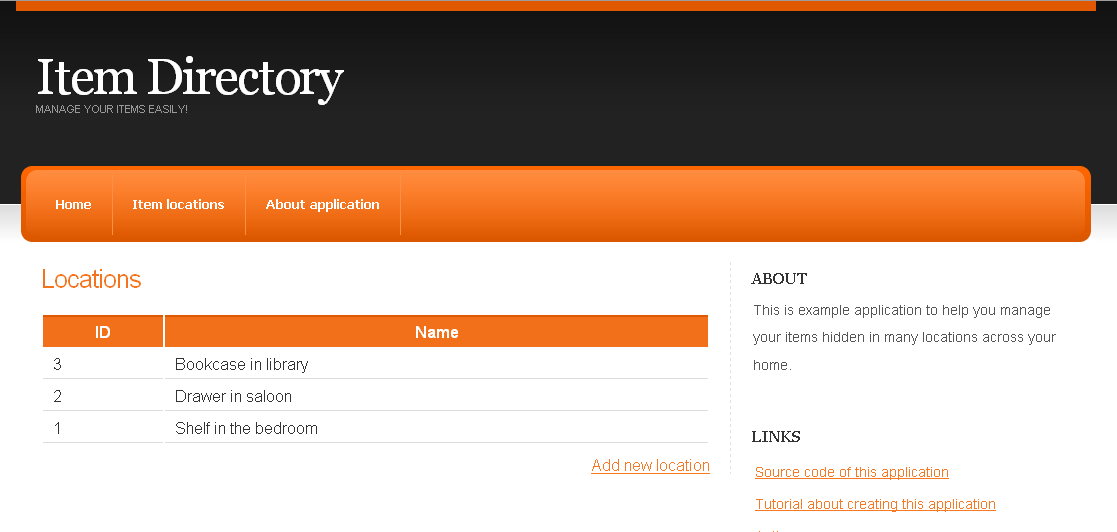
Working as expected. But if we view this page with an empty database it will look rather strange:
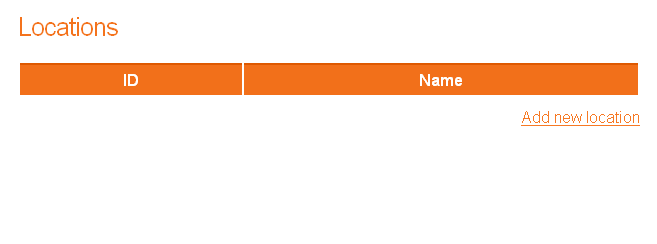
ListView component isn’t rendered (no locations so nothing to show) but as it is placed inside the table and under the row with headers this part of HTML is visible. We must fix it and additionally, we will add an information label when there are no locations.
The simplest way of hiding a component is to call the setVisible(false) method but as we want to hide pure HTML which isn’t directly assigned to any Wicket component, this way won’t work. In such cases the framework provides wicket:enclosure tag (read more about Wicket tags here) which renders html inside only when the connected Wicket component is visible. Let me show this in practice:
<wicket:enclosure child="locations">
      <table>
          <tr><th>ID</th><th>Name</th></tr>
          <span wicket:id="locations">
              <tr>
                  <td><span wicket:id="id"></span></td>
                  <td><span wicket:id="name"></span></td>
              </tr>
          </span>
      </table>
  </wicket:enclosure>
We simply surround the table with wicket:enclosure and define its child component as locations. So when locations.getVisible() returns false, no code inside enclosure is rendered.
Now we need to make location ListView component invisible when the list is empty:
locations.setVisible(!locations.getList().isEmpty());
Moreover we want to show information when there are no locations, so we add a label:
<body>
  <wicket:extend>
      <h3>Locations</h3>
      <br/>
      <wicket:enclosure child="locations">
          <table>
              <tr><th>ID</th><th>Name</th></tr>
              <span wicket:id="locations">
                  <tr>
                      <td><span wicket:id="id"></span></td>
                      <td><span wicket:id="name"></span></td>
                  </tr>
              </span>
          </table>
      </wicket:enclosure>

      <div wicket:id="noLocationsLabel"></div> <!--  NEW label here -->
      <div style="float: right;">
          <a href="#" wicket:id="addLocationPageLink">Add new location</a>
      </div>
  </wicket:extend>
</body>
and in the Java page class we create a Label which is visible when ListView is not:
Label noLocationsLabel = new Label("noLocationsLabel", "There are no locations in the database. Maybe you can add one?");
noLocationsLabel.setVisible(!locations.isVisible());
add(noLocationsLabel);
After these improvements our page is ready:
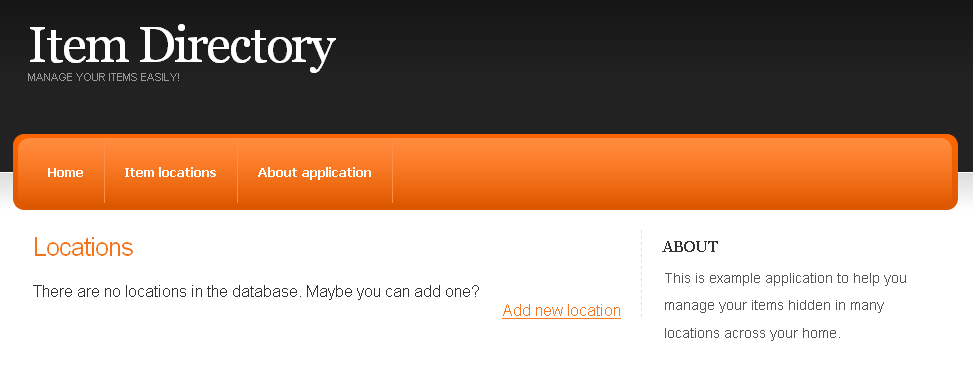
Page is ready, you are ready to use ListView component in your projects so we reached the end of this post. As usual the latest source code is available here.